
What is PixVerse AI?
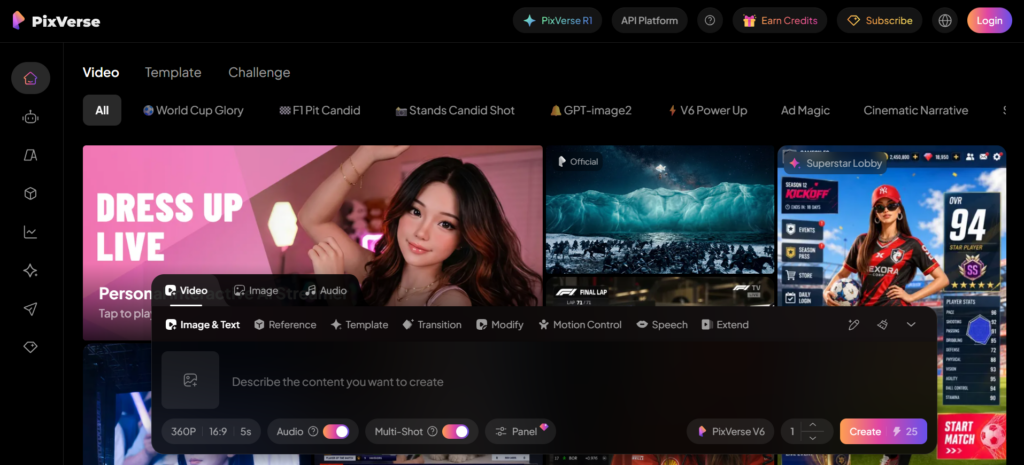
PixVerse AI is an advanced AI video generator designed to transform simple text prompts or images into high-quality cinematic videos within seconds.
In simple terms, you type an idea, or upload a photo, and the system turns it into a moving video scene. This makes it especially useful for:
- Content creators
- Social media marketers
- Storyboard artists
- Beginners exploring video production
Unlike traditional editing tools that require technical skills, PixVerse AI focuses on speed, simplicity, and automation.
Key Features of PixVerse AI
1. Text-to-Video Generation
One of the strongest features is its ability to convert detailed text prompts into realistic video clips.
You can describe a scene like:
“A futuristic city at night with flying cars and neon lights”
and the tool generates a cinematic animation in seconds.
2. Image-to-Video Animation
This feature brings still images to life by adding motion, depth, and realism. It works well for:
- Portrait animation
- Product visuals
- Landscape enhancement
This is widely used in marketing and storytelling content creation.
3. Cinematic Camera Controls
PixVerse AI includes more than 20 motion templates, such as:
- Dolly zoom
- Whip pan
- Slow cinematic push-in
- Parallax motion
These controls help create a film-like experience without using professional cameras.
4. Advanced Editing Tools
The platform also supports creative post-processing features:
- Face swapping
- Lip-sync animation
- Video upscaling
- Style adjustments
This makes it more than just a generator, it becomes a mini AI production studio.
How PixVerse AI Works (Simple Explanation)
The process is beginner-friendly:
- Write a text prompt or upload an image
- Choose a motion or style preset
- Click generate
- Wait 30–60 seconds
- Download your video
No editing software, no timeline, no complexity.
Use Cases of PixVerse AI
PixVerse AI is widely used across different industries:
Social Media Content
Creators use it for TikTok, Instagram Reels, and YouTube Shorts.
Marketing & Ads
Brands quickly create product animations without expensive shoots.
Storyboarding
Filmmakers visualize scenes before production.
Education & Explainers
Teachers and educators simplify complex ideas using visual storytelling.
Pricing and Plans
Free Plan
- Daily credits included
- HD downloads available
- No watermark in many cases
- Ideal for beginners and testing
Standard Plan (~$10/month)
- Around 1,200 monthly credits
- Faster rendering speed
- 720p output
- Full access to advanced features
Pros and Cons of PixVerse AI
Pros
- Extremely fast video generation (30–60 seconds)
- Beginner-friendly interface
- Strong free plan compared to competitors
- High-quality cinematic output
Cons
- Short video duration (5–15 seconds typically)
- Slight difficulty maintaining character consistency in long sequences
- Limited control compared to professional editing tools
Real User Insight (Performance Overview)
Many users compare PixVerse AI with other AI video tools and highlight one major advantage: speed without sacrificing visual quality.
However, for long-form storytelling, creators often combine it with editing software to stitch multiple clips together.
Helpful Video Demonstration:To better understand how PixVerse AI works in real scenarios, you can watch this breakdown:
Expert Tips for Better Results
To get more realistic and cinematic outputs:
- Use very descriptive prompts (lighting, mood, camera angle)
- Keep scenes simple for better clarity
- Combine multiple short clips for storytelling
- Experiment with motion presets for cinematic effects
My Personal Experience with PixVerse AI
After testing PixVerse AI for content creation, the most noticeable advantage is its speed and simplicity. I was able to generate usable video clips within a minute, even without any editing background.
The text-to-video results were surprisingly creative, especially when I used detailed prompts with lighting, mood, and camera instructions. The AI performed best with short, clear scenes rather than complex multi-scene storytelling.
However, I also noticed some limitations. In longer or more detailed sequences, the character consistency sometimes shifts, and certain motions may not feel perfectly smooth. Because of this, I found it works best when you treat it as a clip generator rather than a full video editor.
If you’re interested in AI-powered education tools, Abhyas AI offers a unique personalized learning experience for competitive exam preparation. Read our detailed Abhyas AI review to see how it adapts study plans based on individual performance.
FAQ – PixVerse AI
1. Is PixVerse AI free to use?
Yes, it offers a free plan with daily credits and HD downloads.
2. Can I use PixVerse AI for YouTube or TikTok?
Yes, it is widely used for short-form social media content.
3. How long are the videos generated?
Typically between 5 to 15 seconds per clip.
4. Does PixVerse AI require editing skills?
No, it is designed for beginners with no editing experience.
5. Is PixVerse AI better than traditional video editing software?
It is not a replacement but a faster alternative for generating creative video ideas.
Final Verdict
PixVerse AI stands out as one of the most practical AI video generation tools available today. It is not built for long cinematic films, but it excels in fast, visually impressive, and easy-to-create short videos.
For creators who want to produce content quickly without technical barriers, it is one of the strongest options in its category.
Comments