

Are you ready to enhance your photos and videos with the magic of Remaker AI? Whether you’re looking to improve the quality of a simple photo or create professional‑looking videos, Remaker AI makes it all possible with just a few clicks.
This beginner’s guide will walk you through the process in a fun and easy-to-understand way, perfect for users of any age.
What Is Remaker AI?

Remaker AI is an online tool that uses artificial intelligence to enhance photos and videos effortlessly. You don’t need to be an expert in editing or graphic design to get beautiful results. Whether you’re a casual user, a content creator, or a business owner, Remaker AI makes it easy to polish your visuals quickly and efficiently.
It offers a variety of features like:
- Photo enhancement: Sharpen and brighten your photos.
- Background removal: Easily take out backgrounds for cleaner, professional-looking images.
- Video upscaling: Increase video resolution without losing quality.
- Face swapping: Swap faces in photos and videos with ease.
- Image-to-video creation: Turn your images into stunning animations or videos.
Why Should You Use Remaker AI?
Remaker AI is perfect for anyone looking to improve their digital content. Here’s why:
- User-friendly interface: No need to be tech-savvy; just upload your photos or videos and let the AI do the hard work.
- Instant results: The AI does all the processing in the cloud, meaning you get fast, high-quality results without waiting forever.
- Great for social media: It’s perfect for creating stunning content for Instagram, TikTok, YouTube, or any platform.
- Affordable: You can get started with free features and unlock more advanced tools as you need them.
Step-by-Step: How to Enhance Your Photos Using Remaker AI
1. Upload Your Photo
The first thing you’ll need to do is go to the Remaker AI website. From there, click on the Upload Image button to choose a photo from your device. Whether it’s a vacation snap, a product shot, or a selfie, just pick the image you want to enhance.
2. Choose the Enhancement Tool
Once your photo is uploaded, you’ll have several options depending on what you want to do with the image. Some of the tools you can use include:
- Photo Enhancer: This automatically improves the sharpness, colors, and brightness of your image.
- Background Remover: Remove the background in one click, perfect for product photos or creating more professional-looking images.
- Image Upscaler: Increase the resolution of your photo, which is especially helpful if you need to enlarge an image without losing detail.
3. Let AI Work Its Magic
Once you’ve chosen the tool, the AI will take over and make adjustments to your photo. Remaker AI uses advanced algorithms to enhance your image’s quality, making it look cleaner, sharper, and more vibrant.
4. Preview and Download
When the AI finishes editing your photo, you’ll be able to see a before-and-after comparison. If you’re happy with the results, simply click the Download button to save your enhanced photo. It’s that easy!
How to Enhance Videos with Remaker AI?
1. Upload Your Video
Now, if you’re looking to improve a video, the process is just as simple. Go to the Remaker AI website and upload the video file you’d like to enhance.
2. Select the Video Enhancement Tool
Remaker AI offers a Video Enhancer that works similarly to the photo enhancer. It automatically adjusts your video’s quality by enhancing the resolution, sharpness, and color. This is perfect for making low-quality videos look more professional.
3. Let the AI Work
Once you’ve selected your enhancement preferences, the AI gets to work. It will process your video and improve it without the need for complicated software or manual editing.
4. Download the Enhanced Video
Once your video has been enhanced, you’ll be able to preview it. If everything looks good, hit the Download button to save your upgraded video.
Cool Extra Features You Can Try
Image to Video
Want to create an animated video from your images? Remaker AI makes this easy. Upload your pictures, and it will turn them into a dynamic video or animation. This is a great feature for making engaging social media posts or YouTube content.
Face Swap
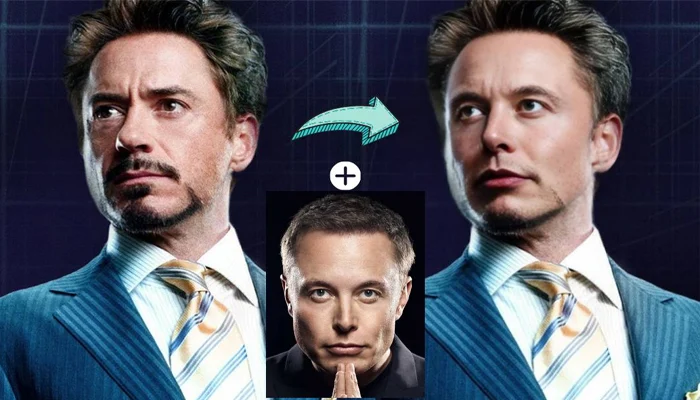
Looking for some fun? Remaker AI’s Face Swap tool lets you switch faces in your photos in just a few clicks. It’s a fun way to create memes, funny photos, or even to play around with friends!
Tips for Best Results
- Use High-Quality Originals: While Remaker AI works wonders on any image or video, starting with a high-quality file will ensure the best results.
- Try Different Features: Don’t be afraid to experiment with the different tools to get the perfect look for your content.
- Lighting Matters: For portraits and selfies, make sure your photo is well-lit to get the most out of the enhancement tools.
If you’re exploring tools like Remaker AI to enhance your visuals, it’s just as important to know how to market your creations effectively. Check out our guide on How to Promote Your New Software Online (A Practical Guide for 2026) to learn practical strategies for reaching the right audience and growing your product successfully.
Final Thoughts
Remaker AI is a game-changer for anyone looking to enhance their photos and videos quickly and easily. Whether you’re creating content for social media, making a promotional video for your business, or just improving a family photo, Remaker AI has got you covered.
So go ahead, give it a try, and see how it can transform your digital content. With its easy-to-use interface, powerful AI, and fast results, you’ll be amazed at what you can create!
Comments