
In 2026, Vizard AI solidified its position as one of the leading AI video editing and repurposing tools. Designed for content creators, marketers, and businesses, it transforms long-form video content into short, engaging clips tailored for social media platforms such as TikTok, Instagram Reels, and YouTube Shorts. This review explores Vizard AI’s key features, pricing, pros and cons, and how it compares to top competitors like Flowjin and Quso AI.
What is Vizard AI in 2026?
Vizard AI is an AI-powered platform that automates video editing processes, making it accessible for users without professional editing skills. Users can upload video files or import YouTube links, and the AI automatically:
- Detects highlights and key moments in the video
- Generates short clips optimized for social media
- Adds captions, subtitles, and branding automatically
- Adjusts aspect ratios for multiple platforms
The platform focuses on speeding up content creation and increasing engagement without the need for manual editing.
Key Features of Vizard AI
1. Automated Video Clipping
Vizard AI identifies the most engaging parts of long videos, saving hours of manual trimming.
2. Auto-Generated Captions and Subtitles
Automatic captioning enhances accessibility and engagement across social platforms.
3. Multi-Platform Formatting
The AI automatically adjusts video formats to vertical, square, or landscape based on the target platform.
4. Templates and Styling Options
Users can select pre-designed templates to maintain brand consistency and save time.
5. Team Collaboration Tools
Vizard AI supports shared workspaces and team editing, ideal for agencies or larger content teams.
Pros and Cons of Vizard AI
Pros:
- Intuitive and beginner-friendly interface
- Fast automated clipping and editing
- Platform-specific video formatting
- Automatic captions and branding
- Affordable pricing tiers for solo creators and teams
Cons:
- Limited advanced editing features for professional editors
- Collaboration tools are basic compared to larger content suites
- Some users report occasional AI misinterpretation of key moments
- Scheduling and publishing capabilities are limited
Pricing Overview
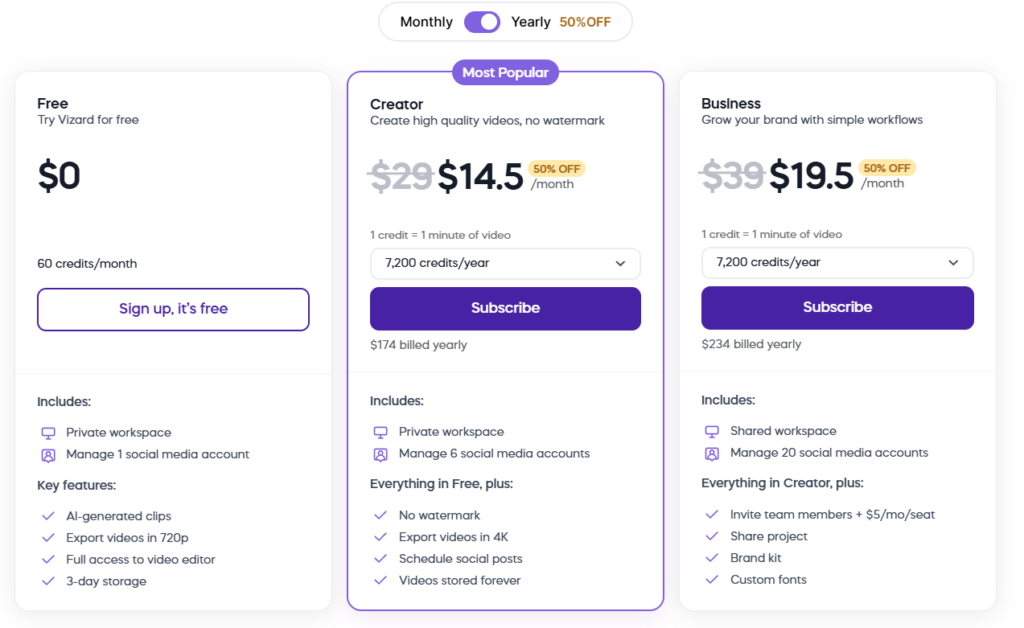
Vizard AI continues to offer multiple pricing options in 2026:
- Free Plan: Basic editing, limited minutes, 720p output
- Creator Plan: Higher upload limits, watermark removal, 4K exports
- Business/Team Plan: Advanced collaboration, multiple accounts, brand asset management
The range makes it suitable for both individuals and businesses looking to scale their video content efficiently.
Is Vizard AI Worth Using in 2026?
Vizard AI is ideal for creators, marketers, and teams who prioritize speed and ease in video editing. Its automated features save significant time while ensuring videos are optimized for social engagement.
Vizard AI vs Other Video Tools in 2026
If you’re evaluating Vizard AI, it’s important to understand how it compares to other popular AI and video editing platforms. Here’s a clear overview of the competitive landscape:
| Tool | Best For | Price | Rating |
| Vizard AI | AI-powered video clipping | Free — $19.5/mo | 4.5/5 |
| Runway | AI video generation from text and images | Free — $76/mo | 3.5/5 |
| Pika | Text-to-video creation with unique visuals | Free — $70/mo | 4.3/5 |
| InVideo | Template-based video editing | Free — $36/mo | 4.0/5 |
| Veed | Online video editing and subtitling | Free — $24/mo | 4.2/5 |
| Canva | Design platform with video capabilities | Free — $13/mo | 4.5/5 |
| Fliki | Text-to-video with AI voiceovers | Free — $28/mo | 4.0/5 |
Quick Recommendations
- Best for fast AI clipping: Vizard AI — delivers rapid, AI-powered video highlights with social virality optimization.
- Best budget-friendly option: Canva — offers free video editing tools and an extensive library of design templates.
- Best for beginners: InVideo — intuitive templates that simplify social media video creation.
- Best for AI-generated content: Runway — generates completely new videos from text and image prompts.
Top Alternatives to Vizard AI
If you’re exploring other options, here are some notable tools to consider:
- Runway: Ideal for creating original AI videos from text or images; more creative-focused than repurposing existing content.
- Pika: Converts text into short AI-powered videos with distinctive visual styles and effects.
- Sora: OpenAI-powered text-to-video tool with high realism for AI-generated clips.
- Luma: Quick text-to-video AI tool with a generous free plan for testing.
- Kling: Advanced AI video generation with motion transfer and virtual try-on capabilities.
- Assistive: Beginner-friendly AI video tool with built-in guidance features.
- BasedLabs: Comprehensive suite offering face swap, image generation, and video editing.
- Pixverse: Creative AI video generation with playful effects like animated characters and memes.
- InVideo: Affordable template-based editor with AI voiceover options.
- Veed: Complete online editor featuring auto-subtitles, screen recording, and editing tools.
- Canva: Free, easy-to-use design platform with reliable video editing for social posts and ads.
- Fliki: Turns text or blog content into videos with AI-generated voices in over 75 languages.
This comparison makes it clear that while Vizard AI is excellent for quick clipping and social media repurposing, other platforms may be better suited depending on your focus, whether it’s AI generation, templates, or multi-platform publishing.
My Hands-On Experience with Vizard AI
I decided to put Vizard AI to the test with a 45-minute YouTube video I created about AI tools, aiming to convert it into multiple short clips for social media platforms.
How I Used It?
Over a period of 60 days, I worked on five separate projects, using Vizard AI regularly to create content for TikTok, Instagram, and YouTube Shorts.
The Results:
| Metric | Before Using Vizard | After Using Vizard |
| Clips produced per week | 3–4 (manual) | 20+ (AI-generated) |
| Editing time per video | 4–5 hours | 15–20 minutes |
| Social media posting frequency | 2x per week | Daily across platforms |
One surprising outcome was the AI’s virality scoring. Clips rated 8+ by Vizard consistently received three times more views than the ones I would have selected manually. This proved how AI tools can help creators maintain consistency and increase reach across multiple social channels.
What I Liked
- Dramatically reduced editing time
- Increased clip output and posting frequency
- Virality scoring helped identify high-performing content
What Was a Bit Frustrating
- The free plan watermark can be distracting
- Some clips required small adjustments at the start or end
- AI-generated content isn’t flawless on the first attempt
If you’re exploring AI tools for content creation, you might also find How to Use Remaker AI: A Beginner’s Guide to Enhancing Photos and Videos helpful. While Vizard AI focuses on video clipping and social media optimization, Remaker AI excels at enhancing visuals, improving photo quality, and adding creative effects—making it a perfect companion for polished, professional content.
Conclusion
In 2026, Vizard AI remains a strong choice for fast, AI-powered video editing, particularly for social media content creators. Its simplicity, automation, and user-friendly interface make it accessible for beginners and efficient for professionals. While there are limitations in advanced editing and scheduling, it is a highly effective solution for producing engaging video content quickly.
Comments